最近一个跨平台项目中要用到MD5算法。立马想到了大名鼎鼎的Cryptopp(Cryto++)。CryptoPP功能强大且应用非常广泛,实现了众多加密算法,被很多项目使用,如OpenSSL。于是从Cryptopp的主页下载的源码进行编译。在Windows上编译为DLL一切良好,但在Mac上为IOS编译后,发现其编译的静态库体积太过庞大,单个平台上库的体积超过20M.在多平台交叉编译,尽管使用Oz优化,.a文件仍超过了100M。因为其大量使用了模板,代码膨胀极其恐怖。这个体积给项目协作带来极大不便。所有对CryptoPP库只好忍痛放弃。
只好转向另一个实现Hash算法的库Hashlib++.该库是一个简单便捷的hash加密算法库。用其官网的话说,就是”simple and very easy to use library to create a cryptographic checksum called “hash” in C++”。
其源码在此处下载!
§§ 编译
- 在Windows下编译:
VS新建空项目,然后加入所有源码,即可使用。但如果要编译成动态库时,就需要对源码进行改动,因为源码没有提供函数导出符号。在需要导出的类前添加 __declspec(dllexport) 修饰即可导出相应的类。
- 在Mac下编译(for IOS):
源码中带的Makefile是for MacOS的。为IOS编译需要重写Makefile,并编译编译脚本。
- 在CygWin下编译(for Android):
此处略去JNI配置。
在编译中出现:
hl_wrapperfactory.cpp: In member function ‘hashwrapper* wrapperfactory::create(std::string)’:
hl_wrapperfactory.cpp:88:58: error: ‘::toupper’ has not been declared
std::transform(type.begin(), type.end(), type.begin(), ::toupper);
这是由于缺少头文件引用引起的问题。添加 ctype.h 头文件即可。
§§ 测试
- windows 下测试代码如下:
#include <iostream>
#include <string>
#include "hashlibpp.h"
using namespace std;

int main()
{
	const string strTest = "wandoer.com";

	hashwrapper* hwMd5 = new md5wrapper();
	string strMD5 = hwMd5->getHashFromString(strTest);

	hashwrapper* hwSha = new sha1wrapper();
	string strSha = hwSha->getHashFromString(strTest);

	cout<<"SHA1:"<<endl;
	cout<<strSha<<endl;

	cout<<"MD5 :"<<endl;
	cout<<strMD5<<endl;

	delete hwMd5;
	delete hwSha;

	return 0;
}
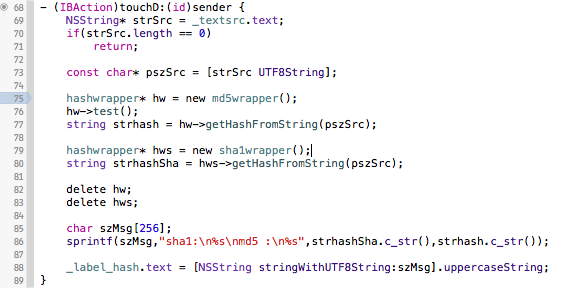
- IOS下测试代码如下
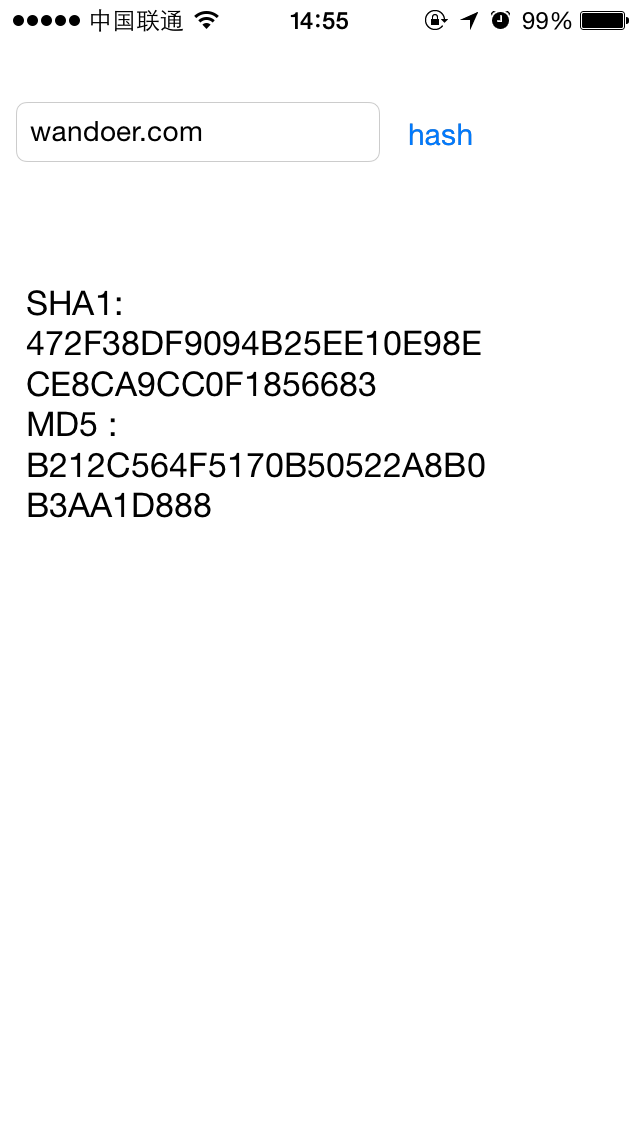
IOS测试结果:
最后,附上修改后的源码hashlibpp_0.3.4。包括Win VS2010工程和IOS编译脚本。
发表回复