什么是 CMake

当我们在构建工程时,在不同的平台上使用不同的工具,如在Windows上使用 Visual Studio 工程, 在 Mac 上使用 Xcode 工程。
这些工程只限于特定的平台。当我们需要跨平台构建工程时,就需要使用 CMake 了,它是一个开源的 跨平台系统构建工具 。同一个 CMake 工程可以在不同的平台上转换为与平台适应的工具,极大的方便了跨平台工程构建。
第一个 CMake
新建一个空目录,在其中新建一个文本文件,命名为 CMakeLists.txt,并输入以下内容:
message("Hello,This is my first cmake project")
好了,你的第一个 cmake 工程就已经建好了。接下来,新建一个文件夹 build, 并在该文件夹下运行命令:
cmake ..
你可能会得到以下输出:
-- Building for: Visual Studio 15 2017
-- The C compiler identification is MSVC 19.15.26732.1
-- The CXX compiler identification is MSVC 19.15.26732.1
-- Check for working C compiler: ....../cl.exe
-- Check for working C compiler: ....../cl.exe -- works
-- Detecting C compiler ABI info
-- Detecting C compiler ABI info - done
-- Check for working CXX compiler: ....../cl.exe
-- Check for working CXX compiler: ....../cl.exe -- works
-- Detecting CXX compiler ABI info
-- Detecting CXX compiler ABI info - done
-- Detecting CXX compile features
-- Detecting CXX compile features - done
Hello,This is my first cmake project
-- Configuring done
-- Generating done
-- Build files have been written to: ....../build
再来看这个路径下,cmake 生成了一堆文件:
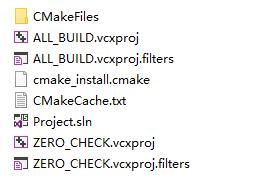
我们成功的使用 cmake 在 Windows 上构建了一个 vs 工程。 当然,如果你的操作系统是 MacOS, 或者 Linux, 结果后有所不同。
其实在 CMakeLists.txt 所以在路径下也能运行 cmake 命令。不过cmake没有提供专门的工具来清理生成的文件,为了方便管理,我们将其生成在 build 目录下。
这个 cmake 工程的作用仅仅是输出一了条消息,并没有什么意义。下面我们来让它更有意义一点:
 这里主要聊一聊如何使用
  整个下午尝试了包括重启路由器、重置路由器、更换各种wifi参数、重启电脑等等一系列操作,均无法解决。